I wanted to check whether a skill actually did its job. The skill ran a goal prompt through OpenCode, called a handful of tools, and left a session behind. Then I read the final message, and the final message told me exactly what I wanted to hear.
That is the problem with grading an agent from its output alone. The reply is the last thing that happened, not the thing you were measuring.
OpenCode ships two ways to run. opencode run prints the assistant’s text to stdout and exits. The TUI is a full-screen program. Between them sits a gap: everything the interface does. How tool calls got grouped, whether a thinking block stayed collapsed, whether a permission prompt fired, what a keybind did, whether the transcript stayed readable or turned into a wall of noise. None of that appears in headless output, and all of it is behaviour.
The same run, two transcripts
The setting I care about is session.verbosity in ~/.config/opencode/cli.json. OpenCode’s prose documentation does not mention it. The published JSON schema at https://opencode.ai/v2/cli.json does, and so does the binary, which implements three levels: low, medium, high. Upstream it arrived in PR #51131.
low collapses each run of tools and thinking into one summary row. medium groups reads and searches but still prints shell output. Here is the same prompt against the same two files, captured from the real TUI, once at low and once at medium.

session.verbosity: "low". Three tool calls and two thinking blocks become one row: + 2 commands, 2 thoughts, 1 read. The answer is unchanged.
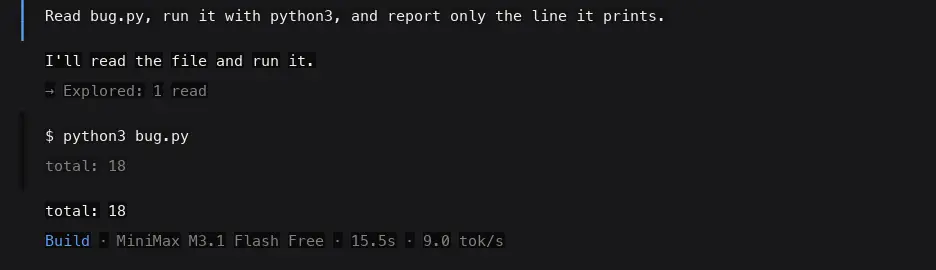
session.verbosity: "medium". The read collapses into → Explored: 1 read, but the command runs in the open, output and all.
Same model, same prompt, same files. The answer is byte-identical: total: 18. The transcript is not. Grade the agent by reading its reply and you see no difference between these two runs. Grade it by looking at what a human would have seen, and the difference is the entire point.
The part I got wrong
My first assumption was that medium meant unbounded scrollback, with tool output expanding until it pushed the conversation off screen. It does not. OpenCode truncates long tool output and replaces the head with a marker:
$ seq 1 400

(393 earlier lines)
394
...
400
So medium is bounded too, just at a much higher ceiling. The claim I actually wanted to make is narrower and holds: low is the only level that guarantees no tool output reaches the transcript at all.
Getting the pixels
Capturing this meant running the TUI the way a person runs it.
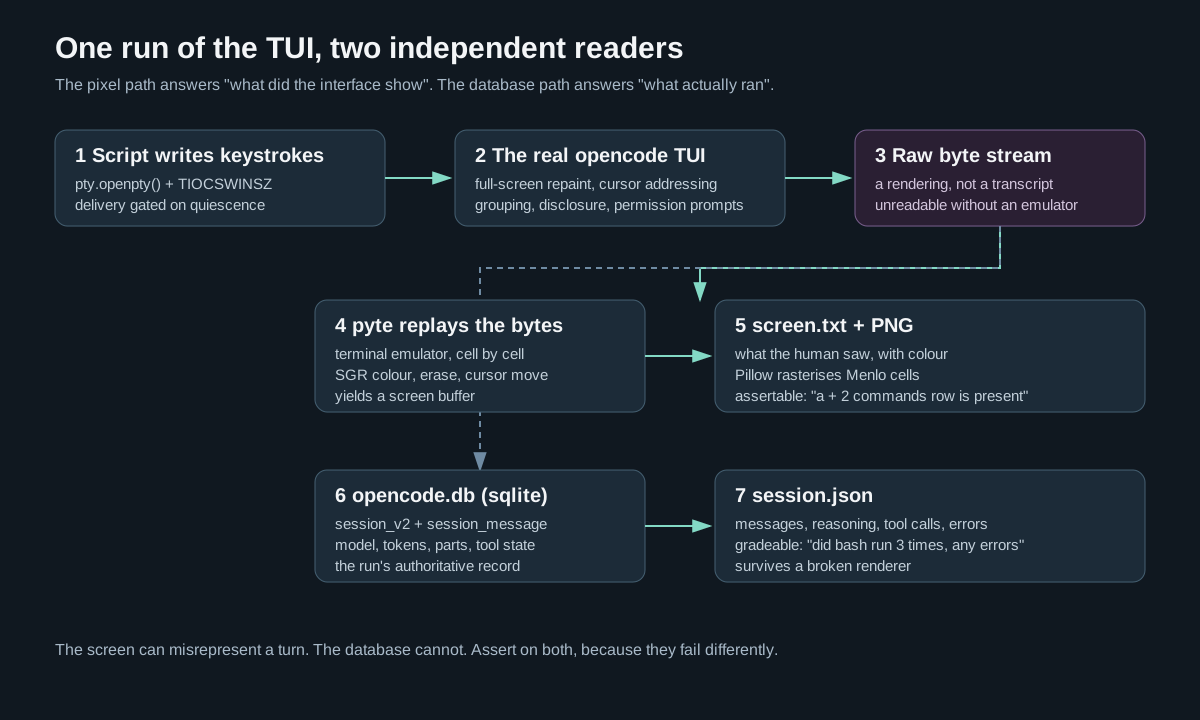
OpenCode’s TUI is built on OpenTUI. It does not write a transcript. It repaints the screen, moving the cursor and erasing regions, thousands of times per turn. The bytes coming out of a terminal are a rendering, and a rendering is not a document.

One run, two readers. A terminal emulator replays the byte stream into a screen buffer; the OpenCode database supplies the structured record. Assert on both, because they fail differently.
Python’s pty module gives the TUI a real terminal to draw into:
master, slave = pty.openpty()
fcntl.ioctl(slave, termios.TIOCSWINSZ, struct.pack("HHHH", rows, cols, 0, 0))
proc = subprocess.Popen(argv, stdin=slave, stdout=slave, stderr=slave, start_new_session=True)
Three details in that snippet are load-bearing, and I got all three wrong on the first attempt.
The window size has to be set before the child reads it. OpenTUI lays out once at startup. Set the size late and you get an 80x24 layout with truncated output that no amount of re-rendering fixes.
Keystrokes sent before the app paints are silently discarded. The pty starts in canonical mode. Write your prompt into the master too early and the tty line discipline buffers and drops it, and the TUI sits at its home screen waiting for input that never arrives. The fix is to wait for the terminal to go quiet, which is the signal that the first frame is up. This also turned out to be the right scheduler for multi-turn runs: deliver the next prompt when the previous turn goes quiet, never on a fixed clock. A slow model stops eating your later turns.
Echo has to be off. Otherwise the pty echoes your injected prompt back into the capture and it lands above the real content as garbage.
Once the bytes are captured, pyte replays them into a screen buffer. That buffer is what a terminal would show, cell by cell, with colour attributes intact, and Pillow rasterises it into a PNG using Menlo as the monospace font. The result is a screenshot of the TUI, not a reconstruction of one.
The part the pixels cannot tell you
A screenshot answers “what did the interface show”. It cannot answer “what actually ran”. For that, the source of truth is OpenCode’s own database at ~/.local/share/opencode/opencode.db.
select id, title, model, cost, tokens_input, tokens_output, tokens_reasoning
from session_v2
where directory = ? and time_created >= ?
order by time_created desc limit 1;

select seq, type, data from session_message
where session_id = ? order by seq;
session_message.data is JSON. An assistant message carries a content array where each part is text, reasoning, or tool, and a tool part carries its name and state.status. That gives the machine-readable version of a run: how many tools fired, which ones, whether any errored, how many tokens the reasoning cost, which model actually answered.
I trust the database over the event stream for the same reason I trust it over the screenshot. The JSON event stream from opencode run --format json intermittently exits zero with empty stdout, and the final step_finish event is dropped in the v2 client. The database carries the model id, the token counts, and the idle outcome every time.
Two more gotchas that cost real time
OPENCODE_CONFIG does not override the model. The variable exists in the binary and is accepted, but the session still runs the global model. What works is a project-level opencode.json, because project config outranks the global file. My capture tool writes the pin into the working directory, and for an existing project it goes into .opencode/opencode.json, which the docs state overrides the project’s own opencode.json without touching it.
macOS /var is a symlink to /private/var. The session lookup matches the directory string exactly. tempfile.mkdtemp() hands you /var/folders/...; the database stores /private/var/folders/.... Resolve the path or every run reports “session not found” while the run was actually fine.
What this buys
Anything where the interface is part of the thing under test.
A skill run end to end should call the tools it was supposed to call, in the order it was supposed to call them, and leave a transcript behind that a person would want to scroll back through. A goal prompt run through the real TUI either closed the loop or did not, and the screen shows which, rather than a summary the agent wrote about closing the loop. Then there are the small things that only exist in a full-screen program: a keybind, a permission prompt, the shape of a collapsed group.
The grading surface is the structured record, not the image. A session.json with per-message text, reasoning, tool names, tool status and error counts answers “did the right tools fire” cleanly. The screenshot answers “did it look right to a human”. Keeping them separate is what makes the assertions stable.
Limits
Free hosted models throttle, and they throttle quietly. A spent quota answers 429 with a retry-after header that OpenCode honours silently for hours, so a capture script without a turn timeout will hang rather than fail. I set a 120 second per-turn ceiling and a 600 second ceiling for the whole run.
The same prompt does not produce the same transcript twice. The model is not deterministic, so these screenshots are illustrations rather than golden files, and any assertion on the capture has to target stable facts. "a + 2 commands row exists" is a fact. "the transcript contains exactly this text" is a coin flip.
This is also the narrow half of the problem. The sibling eval harness in ~/projects/opencode-eval-harness grades the other half: it runs opencode run headlessly against identical tasks and hidden tests, so it measures the diff rather than the interface. Both are worth having. Neither subsumes the other, because a run can pass every test and still leave behind a transcript nobody wants to read.
I have not built the rubric runner yet. What exists today is the capture primitive: a shared skill that runs the TUI, replays the byte stream, rasterises it, and pulls the session record out of the database. The grading layer is unbuilt, and the honest reason is that I have not settled on what a good transcript looks like for the skills I care about. A rubric that only checked tool names would pass on both transcripts above.
Method and captures from a run against OpenCode v2.1.2 on macOS, using opencode/minimax-m3.1-flash-free. The capture tool is a shared skill, opencode-tui-capture, documented with the full pty mechanics and troubleshooting notes.